 Оракул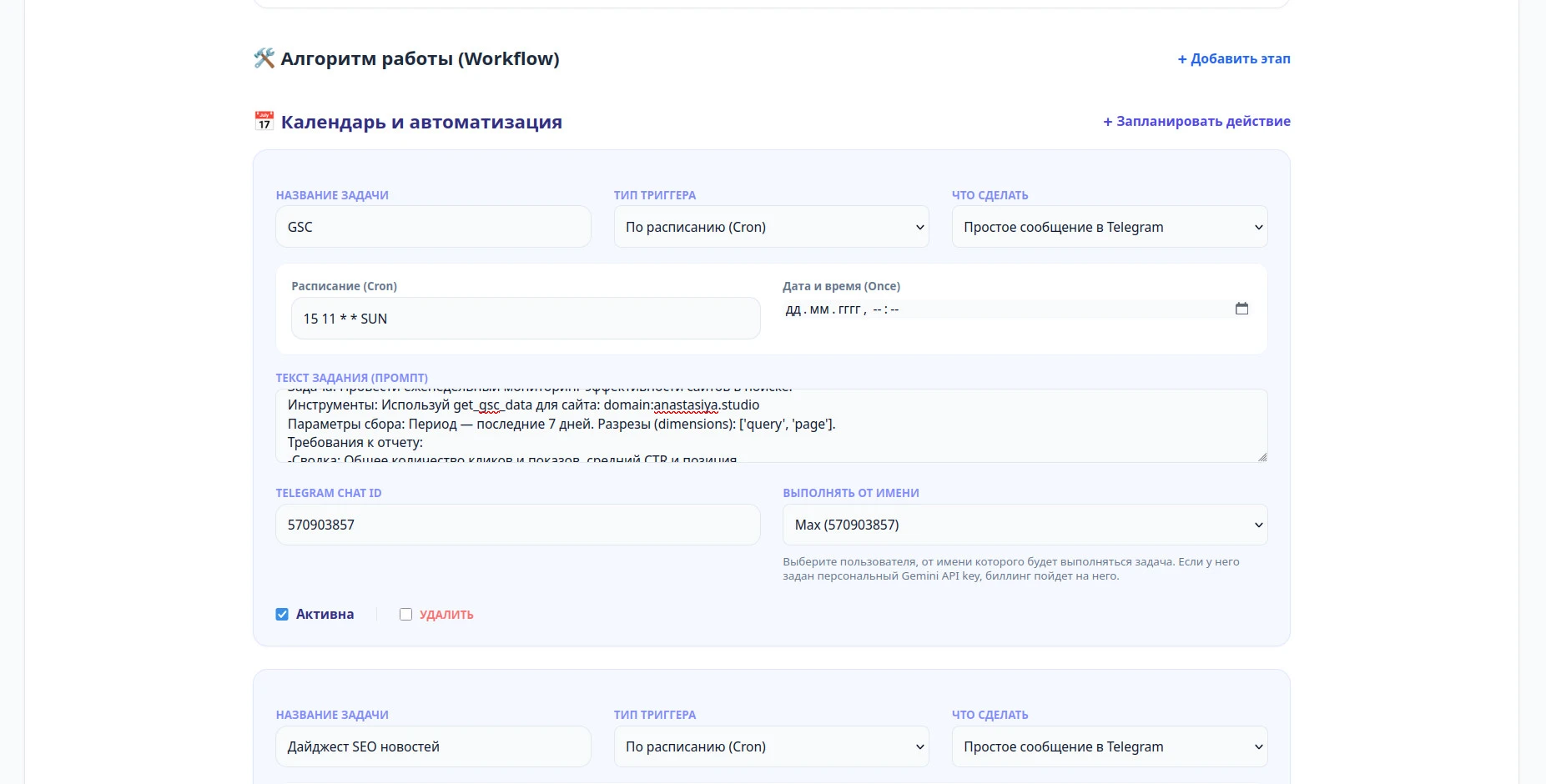
Client reporting is the work that never gets easier with experience. It has to happen for every client, on a deadline, and it eats the last days of every month — and the people doing it are the same account managers you'd rather have talking to clients. Automating the writing part only gets you halfway: someone still has to remember to ask, pull the numbers, and assemble the file. This article closes that gap. The SEO specialist role from the previous guide already has the tools, the knowledge base, and the instruction — here it stops waiting to be asked and starts delivering finished reports on a schedule.
Reactive vs. proactive
A reactive role is a very good employee who never checks their own calendar — capable, but only when someone remembers to ask. A proactive role runs the same task on a cron schedule and hands you the finished file before you thought to ask for it. The role itself doesn't change; what changes is that the task now has a trigger instead of a person.
Anatomy of a scheduled action
Scheduling a new action takes the same handful of fields regardless of what the task does: a name, a trigger type, what to do with the result, a cron schedule, the task prompt itself, where to deliver it, and whose account it runs under. Here's a real weekly report configured this way — and it pulls from two data sources at once rather than one (client identifiers below are placeholders — swap in the real domain, counter ID and chat ID):
The prompt is the part that actually does the work. Notice it doesn't end with "build a PDF and send it to Telegram" — that instruction already lives in the Action field above, so repeating it in the prompt is just noise:
Task: Run the weekly consolidated search-performance and traffic check
for the site.
Knowledge base: example-client — take the client's report format and
commentary style from it.
Tools: Use get_gsc_data for site: domain:example-client.com and
get_yandex_metrika_data for counter ID: 12345678
Collection parameters: Period — last 7 days. From GSC — dimensions:
['query', 'page']. From Metrica — metrics: visits, bounce rate, pages per
visit, grouped by traffic source.
Requirements: Compare both sources against the previous week. Cross-check
discrepancies by source — match GSC's organic traffic against Metrica's
source-level numbers and flag anywhere they don't line up. Call out the
three queries with the largest position drop and any traffic source
where bounce rate rose by more than 10 points.
Why one combined report beats two separate ones
The obvious alternative is two scheduled actions — one for GSC, one for Metrica — each producing its own report. It works, but it's strictly worse: the agent only has one dataset in context per run, so it can't cross-check one source against the other, and the client ends up reconciling two PDFs by hand. Give one run both tools and both requests land in the same context — the "cross-check discrepancies by source" requirement above only works because the agent can see GSC's and Metrica's numbers side by side while it's writing the report. Fewer scheduled actions to maintain is a nice side effect; the real reason is that the comparison itself needs both datasets in the same place.
Why the prompt has to name the exact tool and resource ID
get_gsc_data, get_yandex_metrika_data) and the exact resource (domain:example-client.com, counter 12345678), and there's nothing left to guess. A vague prompt doesn't fail loudly — it produces a plausible-looking report against the wrong site, or plausible-looking numbers the model filled in instead of pulling from the tool. For a report going out under a specific client's name, "plausible" isn't the bar.Who the task runs as, and why it matters
The "run as" field isn't just an audit trail. If that team member has their own API key configured, the task's token usage bills to them instead of the shared account — worth knowing before you schedule twenty of these and wonder why one person's usage jumped.
Common mistakes when scheduling reports
- Leaving the resource identifier out. "Our website" isn't an identifier — a GSC property is a domain or URL prefix, a Metrica resource is a counter ID. Write the actual one.
- Scheduling before the data is ready. A Sunday-morning report over "the last 7 days" needs the schedule and the data window to actually line up — check what your source's reporting lag actually is.
- Never running it manually first. Test the exact prompt as a one-off task before you trust a cron schedule with it — a bad prompt just runs wrong on repeat instead of once.
- One prompt trying to cover every client. A shared template with the client's specifics filled in beats a single vague prompt meant to fit all of them.
- Not naming the knowledge base in the scheduled task. The agent won't pick one on its own — leave it out and the report's format drifts away from what the client is used to. Name it in the task, as in the prompt above.
Knowledge base and skills aren't the same thing
The knowledge base is what the agent knows — your report template, the commentary style each client expects, what a normal week looks like for that account. A skill is what it knows how to do — a specialized capability that changes the technique behind the output rather than the reference material behind it. Knowledge answers "what does our monthly report look like." A skill answers "how do you turn a set of numbers into an argument the client acts on."
Skills are an Agency-plan capability on Orakul, layered on top of the tools and knowledge base every role already has. A concrete example from an adjacent discipline: the conversion copywriter skill on mcpmarket.com adds structured persuasion technique — useful the moment a report stops being a data dump and starts needing to sell the next scope of work.
≈ $430 saved per month at 10 clients
Up to two hours a week, per client — the time that used to go into manually pulling GSC and Metrica data and assembling the file by hand. Across 10 clients that is roughly 86 hours a month; at the fully-loaded junior rate this site uses throughout ($850/mo ÷ 160 h ≈ $5/h), about $430 a month. Substitute your own rate and your real hours — the result comes out far higher.

0 comments
No comments yet — be the first to share your thoughts.
Sign in to post your comment instantly:
…or comment as a guest — guest comments appear after moderation.