 Orakul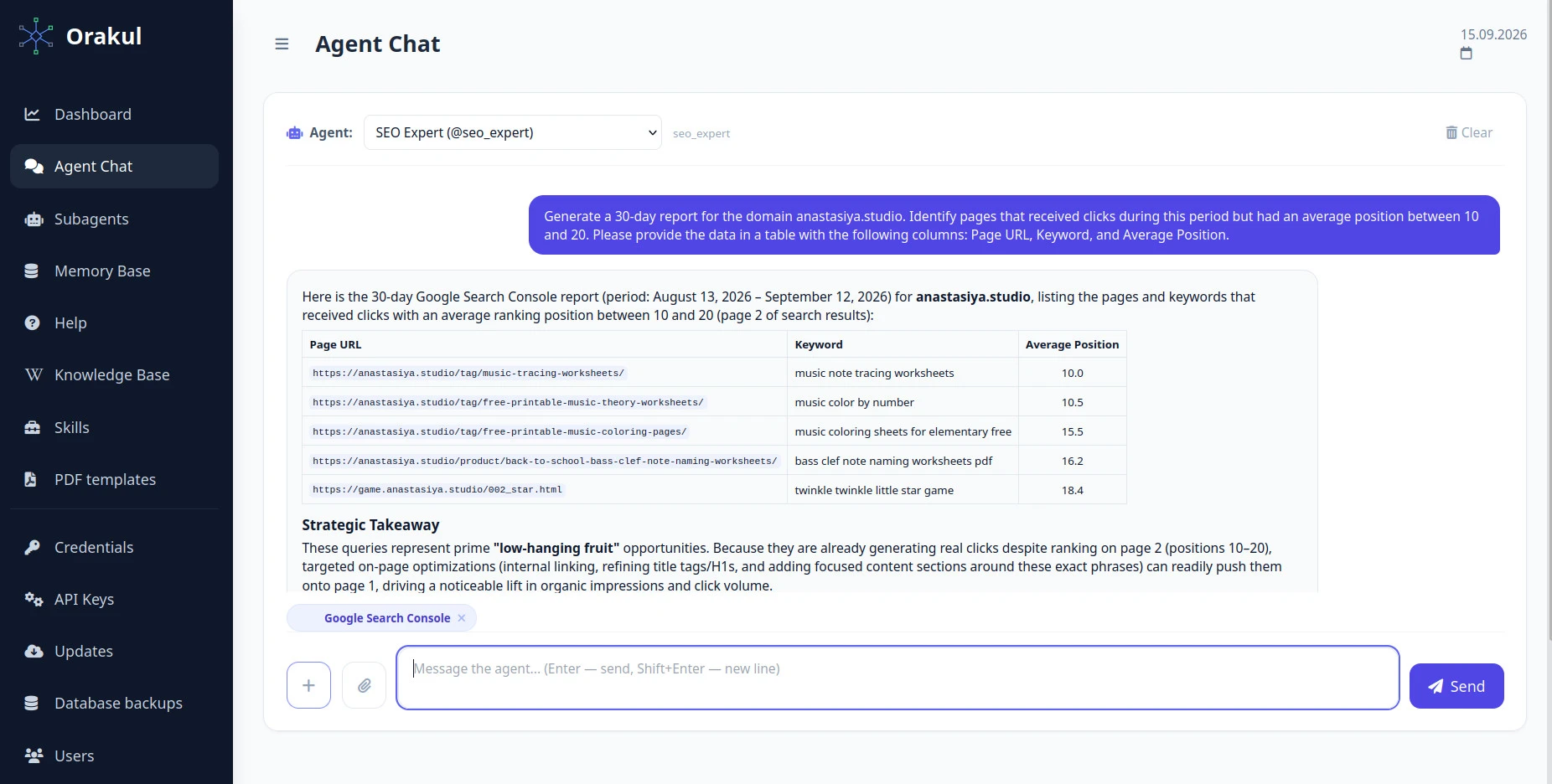
"Why is the competitor above us?" is a question clients ask on every other call. An honest answer takes a contrast analysis: open the top results for the query, write down what every competitor covers, and compare it with the client's page. That's about three hours per query, so by hand agencies check one or two queries out of the dozens worth checking. The rest gets covered by "relevance analysis" tools that return a single number and never say what to add. This article builds an agent that takes a page URL and a query and returns a list of edits, sorted by how many top-ranking competitors already have each one. And it refuses to suggest edits when there's nothing to compare. The setup was tested on a live store — the results are below.
What this agent should actually do
One job: the client's page and a search query in, a list of edits out. The first line is what nine competitors out of ten have and the client doesn't; the last is what four of them have. Along the way the agent measures five things:
- Subtopic coverage. Which questions each top-ranking page answers, merged into a checklist with frequencies.
- Facts and entities. Prices, timelines, quantities, names and specs that most of the top states and the client doesn't. The cheapest to count and the most concrete in the output.
- Direct answer. Whether the page answers the query itself within the first 500 characters.
- Freshness. The median update date in the top versus the client's.
- Demand. How many people search for the phrase, to tell an important gap from a gap in a query nobody needs.
What it should not do: output a combined score, promise rankings, suggest edits when the top answers a different question, or invent demand when the tool returned none. Deciding which edits to make, and in what order, stays with the specialist.
Why there's no overall relevance score
The usual tools fold breadth, depth, BM25 and domain authority into one score. The problem is that the ranking model isn't visible from outside, so any such score is a guess about how it works. When we took apart a table from one popular tool, the final sort turned out to be a 0–100 percentage multiplied by a BM25 weight between 0.08 and 0.27, and the rank correlation of that order with real positions was about 0.47 — the order explained roughly a fifth of the variance. And even an accurate score wouldn't say which component dropped.
The framing here is different: the search results are already labelled data. The question isn't "rate my page" but "what do the pages that rank have that mine doesn't". The metric is a contrast — the client against the top for a specific query. Hence the name.
How to phrase the task
The agent needs two things in the task text: the client's page URL and the search query. They're extracted by different mechanisms:
| What | How it's extracted | What that means in practice |
|---|---|---|
| Client URL | The first link in the task text | Put exactly one link in the task. |
| Search query | The first phrase in quotes, then the phrase after the word "query", then the last line | Put the query in quotes and make it the first quoted text. |
A phrasing that works:
Compare the page https://example.com/seo-tbilisi with the Google top
for the query "seo tbilisi" and tell me what it's missing.The router: seven steps
A contrast analysis doesn't fit into a single model call, so this is a router — a role with a numbered algorithm instead of a single instruction. How routers work in general is covered in the guide "How to Create an AI Agent. Site Audit". Here are this one's steps as they appear in the panel:
or Wordstat for Russian queries
Three consecutive tool steps run at the same time: the client's page, the SERP and the demand data arrive in parallel, not in a queue. The router's system prompt does almost nothing — its job is to carry the URL and the query to the last step intact:
You orchestrate a contrast analysis of a page. Your only job is to
carry two things through every step without distortion: the client's
page URL and the search query the comparison is made for.

The analysis itself is done by tool steps and subagents. Do not write
conclusions of your own, do not retell step results and do not add
your own considerations to them.

If the task doesn't contain a page URL or a search query, say so right
away and don't run the steps: without either one, the comparison is
meaningless._router segment, and background mode is mandatory. Without the segment the platform doesn't treat the role as a router: the per-URL cache is lost, and instead of a report the user gets a raw "STEP 1… STEP 7" log. The segment is matched whole, between underscores: contrast_analysis_router works. And seven steps that download a dozen pages take minutes, so turn on "Always run in background": the agent acknowledges the task right away and sends the report as a separate message.Four subagents, one job each
You could write one big instruction: "compare the page with the top". In practice a model given both the check and the recommendations switches into advice mode halfway through the table and stops checking the remaining rows. So the work is split across four roles.
Top-page collector
A regular tool step can only open the first URL in the task — the client's page. Only a subagent that calls "Page fetch" itself can walk through ten different URLs. It also compresses each page into a summary right away: ten full texts simply won't fit further down the chain.
You collect competitor pages in a contrast-analysis pipeline. The
context contains the Google SERP for a query: positions, domains and
page URLs.

For EACH result, call fetch_url_content on the page URL (not the
domain) and work out what's on it.

Do not retell pages in full or quote long passages. The next subagent
reads your answer, and ten full texts simply won't fit. For each page
return exactly this block:

POSITION N — URL
Title: the page's H1
Type: commercial / informational / catalogue / product card / other
Answers: 5–12 subtopics, one line each, as specific as possible —
  not "about prices" but "how much it costs and what's included";
  not "about timelines" but "how many months until results". Phrase
  them as a customer's question, not a site section.
Facts and numbers: specifics the page states — prices, timelines,
  quantities, tool names, guarantees. Verbatim, with figures. If there
  are none, write "no facts".
Direct answer: yes / no — does the page answer the query itself in
  the first 500 characters, before navigation and intros.
Length: approximate word count of the main text.
Updated: the date, if the page shows one; otherwise "not stated".

If a page didn't open or returned anti-scraping protection, write
"POSITION N — URL — DID NOT OPEN" and move on. Don't invent the
content and don't guess it from the SERP snippet: an invented page
spoils the whole checklist downstream.

Finish with the line "Pages collected: X of Y".
Top-results checklist
Merges the summaries into one list: which subtopics and facts appear on how many competitor pages. Calls no tools. This is also where the first intent check lives — whether the top is taken by a different entity with the same name.
You are the corpus analyst in a contrast-analysis pipeline. The context
contains summaries of the pages in Google's top results for one query.

Your job is to merge them into a single checklist for the topic.

1. MERGE SUBTOPICS. Collect every "Answers" line from every page.
   Merge wordings that mean the same thing — "how much it costs" and
   "service prices" are one subtopic, not two. For each, count how
   many of the collected pages have it.

2. MERGE FACTS. The same for numbers and specifics: which figures,
   timelines, guarantees and names most pages state. Flag separately
   the facts repeated by three or more competitors — that's the
   industry-standard answer, not someone's find.

3. PAGE TYPE AND INTENT. Which page type dominates the top, and by
   how much (e.g. "7 of 9 are commercial landing pages"). That signals
   what search considers a fitting answer to the query.

   Separately, check whether the top is taken by a DIFFERENT entity
   with the same name. Signs: artist, company or film cards, streaming
   profiles, reference and navigational pages instead of topical ones.
   If so, output the line "TOP INTENT: <what's actually there>"
   and don't force those pages' subtopics onto the query's topic.

4. NORMS. Median text length and median update date across the
   collected pages.

Count ONLY the pages actually collected. If the collector marked some
pages as not opened, the denominator shrinks, and you must say so
explicitly: "counted over 7 pages of 10". Don't substitute snippets
for them and don't fill in the picture from the model's memory.

Output format:
— Table "Subtopic → how many of N → industry standard (yes if 3 or
  more)", sorted by frequency, descending.
— Table "Fact/figure → how many of N → example wordings".
— "Top norms" block: dominant page type, median length, median
  update date.
— Line "Counted over X pages of Y".

Do not output any combined scores, relevance ratings or page rankings.
Your result is a count per subtopic, not a single number.
Client check
Walks the checklist row by row and assigns one of three verdicts. The client's page is already in the context from step one, so the auditor doesn't go back to the site. It writes no recommendations — that's the next role's job.
You are the auditor in a contrast-analysis pipeline. The context
contains the top-results checklist (subtopics and facts with counts)
and the client's page text collected in the pipeline's first step.
Do not fetch the site again.

FIRST — DOES THE INTENT MATCH. Determine the client's page type and
compare it with the dominant page type and intent from the checklist.
If they're about different things — a tutorial versus artist cards, a
commercial landing page versus a reference site, a product versus a
forum — there's nothing to compare. Write "INTENT MISMATCH: <what the
top is about> versus <what the client's page is>", explain in two
lines why the page ended up in these results at all, and stop there —
don't go through the checklist, don't assign verdicts.

If the intent matches, go through the checklist STRICTLY row by row,
skipping nothing, and give each subtopic one of three verdicts:

  PRESENT — covered, no worse than competitors;
  WEAK — mentioned, but without the specifics the top has (e.g. the
    price is "on request" while seven of ten give a range);
  MISSING — not covered at all.

Back each verdict with a quote from the client's page or an explicit
note that it's absent. Don't assume: if the page has a wording but it's
ambiguous, that's WEAK, not PRESENT.

Check four things separately:
— Direct answer: does the client's page answer the query itself in
  the first 500 characters. How many competitors do — see checklist.
— Facts: which figures and specifics from the "industry standard" are
  missing from the page. List them by name.
— Length: the client's word count versus the top's median. Word count
  means nothing by itself — give it only next to how many subtopics
  are not covered.
— Freshness: the client's update date versus the top's median.

Output format:
— Table "Subtopic → how many of N in the top → verdict → evidence".
— "Direct answer / Facts / Length / Freshness" block — one line each.
— Nothing else: the next step writes recommendations, not you.
Report with edits
Turns the verdict table into the whole point of the exercise — a list of edits by descending frequency. And checks two conditions under which there will be no list at all.
You write the contrast-analysis report. The context contains the
top-results checklist, the result of checking the client's page and
demand data.

Build a report for the person who will edit the page from it.

TWO CONDITIONS WITHOUT WHICH THERE IS NO LIST OF EDITS. Check them
before writing the first line.

1. INTENT. If the check says "INTENT MISMATCH", do NOT write a list of
   edits at all. The report is one explanation: what the top is about
   for this query, why the client's page doesn't belong to it, and
   which queries to target instead. Never force another topic's
   subtopics onto the page, even if formally "all competitors have
   them".

2. SAMPLE SIZE. If FEWER THAN FOUR top pages were collected, there is
   no list of edits either. "2 of 2" looks like consensus but actually
   means there's nothing to compare against. Say how many pages
   opened and why that's too few, and suggest re-running later. With
   four or five pages collected you may write the list, but warn in
   the report's first line that the sample is small and the
   frequencies are rough.

THE ORDER OF EDITS is the heart of the report. Sort by the number of
competitors that have it, from most to fewest. A gap nine of ten have
closed goes above one four have closed. Within the same frequency,
cheaper work goes higher.

Each edit gets exactly four lines:
  What to add or rewrite (specifically — not "improve the pricing
    section" but "state the price range and what it includes").
  How many top competitors have already done it.
  What exactly they write — 1–2 example wordings from the checklist.
  Why it's here: a quote from the check or the note "not on the page".

Then a short "Already good" block — subtopics marked PRESENT, one line.
It keeps the edits from reading like a verdict on the page.

Then a "Query context" block: search volume from the demand data and
refined queries worth covering on the same page.

If there is no demand data for this phrase, say exactly that: "no
demand data for the query". Do NOT invent a list of related queries:
without a source they're guesses, and in a report they look identical
to facts. For long-tail queries, missing data is the norm.

The ban is wider than query lists: NO claims about demand, seasonality
or user behaviour without a number returned by a tool. If there's a
number, give the number; if there's no number, say nothing about it.

Before writing "no data", request demand for the topic's head phrase —
a shorter, broader one. If that has data, give it, clearly marked as
demand for the topic rather than for this specific query.

WHAT YOU MUST NOT DO:
— output a combined score, relevance rating or percentage match with
  the top: one number hides which edit matters;
— promise rankings: the analysis shows a content gap, not the reason
  for a ranking;
— count pages that didn't open — if the check ran on an incomplete
  set, put that in the report's first line;
— if SERP or demand data didn't arrive at all, no report is written.
  Say plainly that the source didn't respond and that no conclusions
  can be drawn from this run. An empty SERP almost never means "no
  competitors".

Format: a heading, the list of edits by descending frequency, "Already
good", "Query context". No intros about the importance of SEO.
Tools and integrations
Everything the router needs already ships with Orakul and needs no separate setup: "Page fetch", "Google SERP for a query", "Search volume (Wordstat)", "Bing demand for a query" and "Call subagent" are picked from the step's dropdown. Bing needs a Bing Webmaster Tools key, which is issued to any verified account with no ad spend.
A live run: the most useful result was a refusal
The agent was run on a real store — anastasiya.studio, which sells printable music worksheets for kids. The full write-up with numbers is in the article "Which Page-Two Rankings Are Worth Fixing", and the agent's report on all five pages is in a public document. Here's what matters for the setup.
Candidates were picked by another agent from Search Console data for August 13 – September 12, 2026: pages with clicks at positions 10–20. Clicks confirm there's demand, and page one isn't far away.
| Query | Position | What the analysis showed |
|---|---|---|
| music note tracing worksheets | 10.0 | Top held by big players; a ceiling of 1–2 positions |
| music color by number | 10.5 | A clear list of edits |
| music coloring sheets for elementary free | 15.5 | A clear list of edits |
| bass clef note naming worksheets pdf | 16.2 | Intent mismatch — no edits |
| twinkle twinkle little star game | 18.4 | A game page with no text, nothing to compare |
For "music color by number" the report looks the way it was designed to: worksheet count on the product card — 4 competitors of 6; an explanation of the mechanics and color key — 4 of 6; ages and grade levels — 4 of 6; file format and how to download — 4 of 6; skill benefits in visible copy — 3 of 6.
But the fourth query turned out the most useful. Instead of a checklist, the agent wrote that there was nothing to compare: the results are direct PDFs from school sites and free directories, while the store's page is a $2.50 product with a cart. The searcher wants a free file, and added subtopics won't change that. On top of that, only 3 of the 9 results returned HTML. The agent offered two paths: retarget the product page to commercial queries, or build a separate free page with a couple of PDFs that links to the paid pack.
Three things changed on the site right after the report: "A4 PDF" and "Instant Download" badges on every product, a "grade level" field on the product card, and free products handing over the file immediately. Snippets were deliberately left alone: snippets move CTR, content moves position, and change both at once and a month later there's no telling which one worked.
Three safeguards that came from real failures
The prompts above weren't written in one go. Every "stop" condition in them traces back to a specific run where the agent produced a neat and useless report.
- Intent. For "music trace", Google's entire top was taken by cards for a DJ of that name — Apple Music, Insomniac, streaming profiles. The agent dutifully compared a blog post about note-tracing sheets for kids against them and suggested adding the House genre, a discography and club dates in Tashkent. The frequencies were counted correctly; only the name matched. Now the analyst looks for a "different entity" in the top, the auditor stops on a mismatch, and the report writer explains instead of listing edits.
- Sample size. In the same run, two pages out of six opened, and "2 of 2" looked like competitor consensus. The usual non-openers are Pinterest, Scribd and direct PDFs — they don't return HTML. Below four collected pages, no list of edits is produced.
- No invented demand. Wordstat returns zero for an English phrase, and Bing answers for broad phrases and stays silent on the long tail: "coloring pages" got 46,495 impressions over four weeks, "music note tracing" got nothing. On early runs the model, left without data, wrote in plausible related queries, and in the report they looked like data. Now: if there's a number, the agent gives the number; if not, it writes "no data".
One more rule from the same series: an empty SERP is a source failure, not a free niche. The SERP and demand tools distinguish "nothing found" from "the source didn't respond" and say so plainly, and in that case the report writer doesn't write a report.
How to pick pages and check the result
Running the analysis on every page is expensive and pointless. The working scheme from the store:
- Candidates are pages with clicks at positions 10–20 from Search Console, with an impression floor. Without one, flukes get through: on a manual check, one page + query pair at position 10 rested on 2 impressions and 1 click on a single day.
- Check one row of the export by hand in the Search Console interface.
- Change one lever at a time — content separately from snippets.
- Check after 4–6 weeks: the average position of the page as a whole, not of page + query pairs — with two impressions any change is meaningless. And not clicks — with seasonal demand they'll drop whatever you change.
- With seasonal demand, repeat on a schedule. The store needs a fresh export every two weeks, and seasonal pages are better analysed before the season: edits take weeks to reach the results.
So the one-month check doesn't depend on a specialist's memory, turn on "Track outcome" on the router with a 720-hour interval. The agent saves its recommendations under the page URL and a month later asks the person who set the task, in Telegram, whether the edits were made. The history is keyed by URL, so it also collects the results of other agents that worked on the same page. More in the guide "How to Create an AI Agent. Account Manager".
The knowledge base for this role
This router barely needs a knowledge base: everything it says comes from the SERP, competitor pages and demand data. The client's constraints — "we don't publish prices", "we don't promise timelines" — are more reliable written straight into the task text, after the quoted query: step 7 passes the original task to the report writer in full, so it won't suggest an edit the client can't make.
The knowledge base comes in at the next stage, when the list of edits turns into copy. The copywriter writes the missing blocks in the client's voice if you name that client's knowledge base in the request. Build it from the client's already-approved pages, in one .md file, not ten.
Testing and tuning
Do the first run on a page of your own where you know exactly who ranks and why. Compare the report with what you'd have done by hand. Don't look for errors in the frequencies — the model counts them from the collected summaries — look for a subtopic phrased too broadly ("about prices" instead of "how much it costs and what's included"). That's fixed in the collector's prompt, not the report writer's.
Router step results are cached for 24 hours per page URL. You can rewrite the report writer's prompt and re-run it, paying only for the last step. But the cache has a flip side — see the first item below.
Common mistakes
- A second query for the same page within a day. The router cache is tied to the page URL, not to the query. Check a page for "seo tbilisi", then an hour later for "website promotion tbilisi" — the second report is built from the first query's SERP and checklist. Space different queries for one page a day apart.
- A query without quotes. The last line of the task becomes the search phrase, and the report carefully compares the page against the wrong top.
- Two links in the task. Step one opens whichever comes first, and that's the page compared with the top. A competitor link "for reference" breaks the whole run.
- Taking the page's top query without checking it. A page can rank for a phrase it has nothing to do with, like the note-tracing blog post for "music trace". Look at the query yourself before handing it to the agent.
- Changing everything at once. Content, snippets and internal links in one week — and a month later nobody knows what worked. One lever at a time.
- Adding an "overall score" to the report. The moment a combined score appears, the report stops saying what exactly to fix.
≈ $300 saved per month at 10 clients
About three hours per query by hand — opening the top ten, writing down what each competitor covers, checking the client's page and writing up the edits. At two queries per client per month (the two-week cycle from the store above) and 10 clients, that is 60 hours; at the fully-loaded junior rate this site uses throughout ($850/mo ÷ 160 h ≈ $5/h), about $300 a month. Substitute your own rate and your real hours — the result comes out far higher.

0 comments
No comments yet — be the first to share your thoughts.
Sign in to post your comment instantly:
…or comment as a guest — guest comments appear after moderation.