 Orakul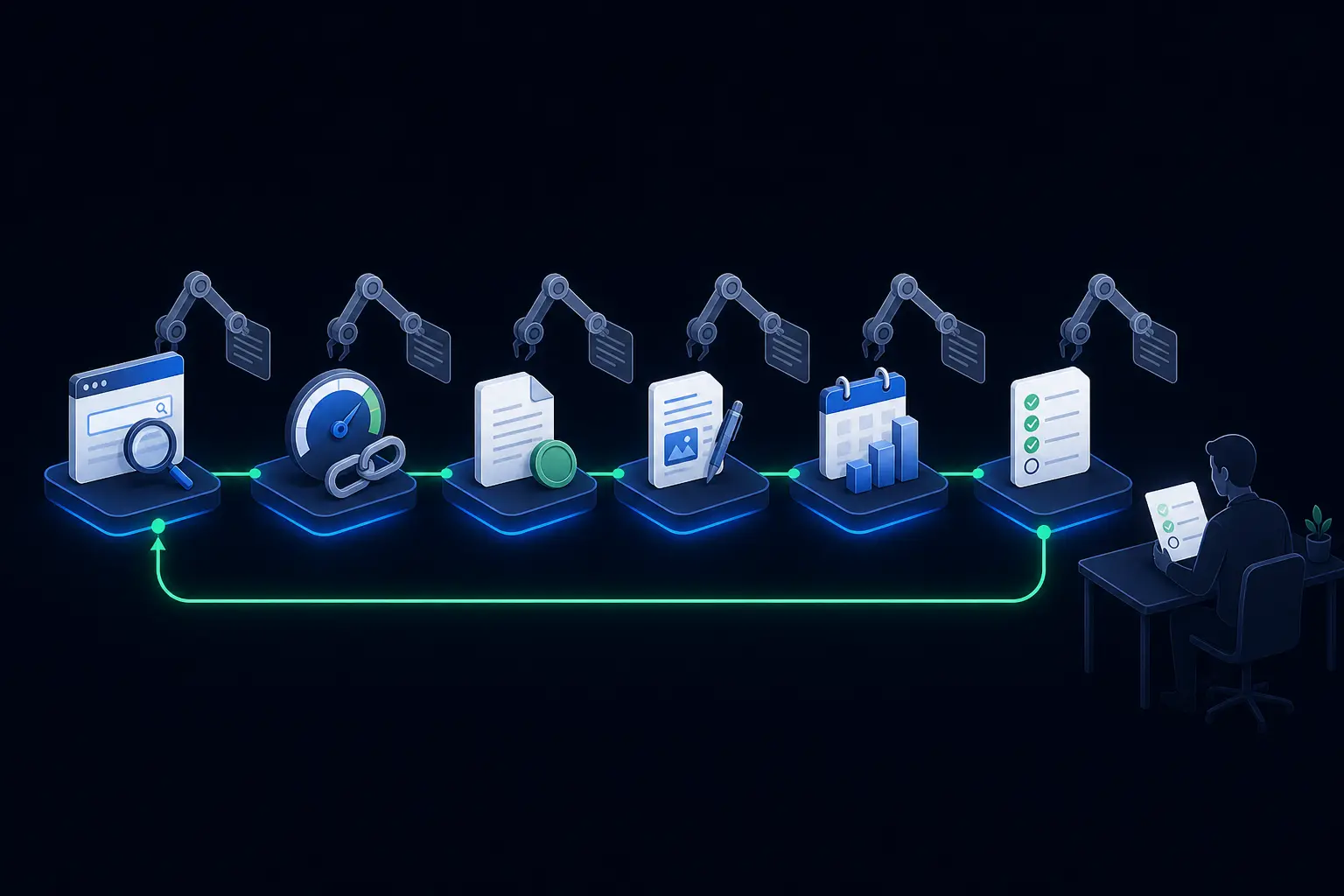
Everyone at your agency already uses AI. A specialist asks ChatGPT to outline an audit, a manager has it rewrite a client email, a copywriter brainstorms headlines with it. And the processes haven't changed. The lead still waits until Thursday for a proposal, the report is still assembled by hand from five browser tabs, and nobody knows for sure which of last quarter's recommendations the client actually implemented. The reason is simple: a chat speeds up one action of one person, but it doesn't run the process on its own. This article maps every process of an SEO agency, from the first inquiry to the monthly report: what an AI agent can do end to end in each one, from which data, on which trigger — and what must stay with a human.
What AI process automation actually means
AI business process automation is when an AI agent runs a whole stage of a process instead of helping a person with one step of it. For an SEO agency there are four tests:
- It starts without a person. An event triggers the agent (a visitor enters their site's URL, a request arrives in Telegram) or a schedule does (every Monday at 9:00) — not an employee who happened to remember.
- The data comes from systems, not from the model. Rankings and clicks come from Search Console, traffic from Google Analytics, speed from PageSpeed, rates and terms from your own documents.
- The output is finished. A file you can send — a report, a PDF proposal, copy, a website — not advice on how to make one.
- There is follow-up after delivery. The system remembers what it recommended and finds out whether it was done.
If an employee copies an answer from a chat into a document, that's AI assistance, not automation: the process still rests on a person. Below, all six processes are taken through these four tests using Orakul — an AI agent platform installed on the agency's own server.
The map: six SEO agency processes and what AI takes over
| Process | What the AI agent does | Before → now |
|---|---|---|
| Lead generation | Audits the visitor's site as a lead magnet, notifies the owner, sends a follow-up, books the call | 4 hours → 3 minutes |
| Site audit | A six-step router: page code, PageSpeed, backlinks, AI readiness, two subagents | ≈ 3 hours → minutes in the background |
| Sales proposal | Nine roles: competitors, work plan, budget at your rates, a branded PDF | 2 days → 5–10 minutes |
| Content | Drafts in the client's voice, demand data, SERP breakdown, images, landing pages | 5+ hours → a draft to edit |
| Reporting | A combined report from Search Console and Analytics on schedule, PDF in Telegram | 2 hours per client → 2 minutes |
| Recommendation follow-up | The agent asks whether its advice was implemented and keeps a history per site | ≈ 3 hours per account → one lookup |
Each process is covered in detail below. Five of the six have their own step-by-step guide with role configuration — the links are in the relevant sections.
1. Lead generation: an audit as a lead magnet and an AI sales manager
AI sales automation at an agency doesn't start with a mailing — it starts with a reason to talk. For an SEO agency the best reason is an audit of the prospect's own site: it's about their money, not your services.
In Orakul the audit works as a lead magnet in two channels: a form on your website (there's a ready widget for WordPress) and a public Telegram bot. A visitor enters their site's URL and three minutes later gets a breakdown: speed and Core Web Vitals, backlink profile, content, competitors, AI search readiness. Right below it sits your call to action and a button with your link. A limit per visitor and per IP address keeps anyone from burning through your tokens, and the report language follows the language version of your site. You can see what such a report looks like on this site's audits page.
What happens next, with no manager involved:
- The owner learns about the lead immediately. A Telegram notification says who ran the audit and on which site, with the full report attached as a file named after the site. By the first call your manager already knows the weak spots of the prospect's site.
- A follow-up after 24 hours. You write the text; it goes only to people who agreed to notifications, and only once.
- An AI sales manager answers questions. A separate agent answers from a single knowledge-base file — services, prices, terms — and when the lead names a time for a call, it records it and notifies the owner of the booked slot.
- The lead lands in the CRM. An agent connected to Bitrix24 can create a lead, add a comment, assign a task to a manager and show funnel statistics right from the chat.
What stays with a human: the call, the assessment, the price of the deal.
2. Site audit: a six-step router
The internal audit — for a new client after signing, or for an existing one every quarter — goes deeper than the public one. It's run by a router agent: a role that doesn't answer by itself but walks through an algorithm step by step. The first three steps collect data: the page's code and structure, PageSpeed, the backlink profile. The next three hand what was collected to subagents, and the last of them writes the final report without touching any tools.
Two properties make it a process rather than a one-off generation:
- Background mode. Six steps take minutes. The employee gets an acknowledgement right away, and the finished report arrives in the same chat as a separate message.
- A 24-hour cache per URL. A second document about the same site within a day doesn't re-collect data — only the text is rebuilt. That's why the numbers in the audit and the proposal for one client match, and the second document arrives in seconds.
The full setup, with every step's instruction, is in the guide "How to Create an AI Agent. Site Audit".
3. Sales proposal: from a URL to a PDF
The proposal is an agency's most expensive document: it's made before the client has paid, and the longer it takes, the colder the lead. By hand it's about six hours of work for three people, stretched over two days.
In Orakul the proposal is built by a pipeline of nine roles. A nested router finds competitors through search and pulls their traffic. Three auditors cover the technical side, content and commercial factors. A plan composer turns the findings into four months of tasks, an analyst turns hours into money using your rate table from the knowledge base, and a copywriter writes the text into the slots of a PDF template with your logo and colour.
The same role produces two different documents depending on how the request is phrased. "Prepare a proposal for example.com" gives a 17-page technical proposal for the client's SEO lead. "…for the director" gives nine pages for the person who signs off the budget. Both samples are attached to the guide "A Sales Proposal in 5 Minutes".
What stays with a human: the discount, the final figure and the moment of sending. The numbers in a proposal are your commitments, not model output.
4. Content
AI content automation usually breaks on one thing: the copy comes out the same for every client. An agency has dozens of clients in unrelated industries, and each has its own voice.
Orakul solves this by naming the knowledge base in the request instead of hard-wiring it into the role. One copywriter serves every client: "Client: X. Knowledge base: X" — and it writes with client X's terminology and figures; a different knowledge base in the next request, a different voice. The knowledge base is built from the client's already-approved material, in a single file. The difference between a draft without a knowledge base and one with it is shown on two real texts in the guide "How to Create an AI Agent. Copywriter".
Around the text itself, the agent covers the neighbouring routine too:
- Demand and keywords. Weekly organic impressions for a query from Bing Webmaster Tools — the key is issued to any verified account, with no ad spend — and search volume and related queries from Yandex Wordstat for sites on the Russian market.
- Competitors in the SERP. Who ranks in the top of Google and Yandex for a query, with which pages and titles, and whether there's an AI answer above the results. That's what a content brief is built on: what the client's page lacks compared with the top.
- Images and landing pages. Pictures for articles and posts; a landing page with real photos, delivered as an archive in 5–8 minutes in the background.
What stays with a human: editing and publishing. A draft is not a publication.
5. Reporting on schedule
The regular report is an agency's most frequent process and the most obvious candidate for automation: the same sources, the same structure, every week, for every client.
In Orakul a report is a scheduled action on the agent's card: a cron expression ("every Monday at 9:00"), the task text and the delivery method — a PDF report in Telegram. The agent pulls Search Console and Google Analytics 4 data for the period itself (and Yandex Webmaster and Metrica for sites on the Russian market) and combines them into one document. The task runs on behalf of a chosen employee: if they have a personal API key, token spend goes to them.
Two details without which scheduled reports start going wrong: the task must name the tool and the resource ID explicitly (the Search Console property, the Analytics property), and one combined report is more useful than two separate ones. Why — in the guide "Automating Agency Reporting".
But a report built from tables is only half the job. The other half is in the section on the personalised report below.
6. Automatic follow-up: were the recommendations implemented
An agency's most expensive loss doesn't show up in any report: recommendations that were given and forgotten. An audit in week one, a content plan in week two, report conclusions at month's end — and before the call the account manager spends half a day finding out what was done.
In Orakul this is handled by the "Track outcome" checkbox on the card of any agent. After each task the agent saves what it recommended and for which site, and after a set interval it asks the person who assigned the task, in Telegram: done or not? The answer is recorded under one of three statuses — "awaiting confirmation", "done", "not done" — with any clarification kept in a note.
The history is keyed by the site's URL. Querying the history for one URL returns the recommendations of every agent that worked on that client: audit, content, reporting. The result is an account file nobody maintains by hand. Sensible intervals are measured in weeks: 168 hours for an audit, 336 for a content plan, 720 for a monthly report. Details are in the guide "How to Create an AI Agent. Account Manager".
The personalised report: built on implemented recommendations, not retold tables
A typical automated report reads like this: "Impressions up 12%, clicks down 3%, average position 18.4." The client reads the numbers and misses the main point — what they're paying for and what happens next. Generating that report in 2 minutes instead of 2 hours saves the agency time, but it doesn't make the report any better.
The report that gets a contract renewed answers different questions: what we did, what changed after it, what got stuck, and what we do next. In Orakul it's built by two features from the previous sections working together: the recommendation history gives the list of what was implemented, with dates, and the analytics tools give the numbers for the periods before and after.
The task for such a report in the scheduler looks like this. Assign it to an agent without workflow steps — such an agent has the full toolset available:
Client: Example. Site: https://example.com. Knowledge base: Example.
Prepare the monthly client report on implemented recommendations.

1. Call get_outcome_history for https://example.com without an agent
   key. Split the records into three groups: "done", "not done",
   "awaiting confirmation".
2. For each implemented recommendation, call get_gsc_data (property
   sc-domain:example.com) and get_ga4_data (property 123456789):
   the 28 days before the recommendation date and the last 28 days.
3. Report structure:
   - What was done: the recommendation, its date, which agent gave it.
   - What changed after: before and after figures for each item.
   - What wasn't done, and why, if the note gives a reason.
   - Next month's plan: three tasks that don't repeat what's done.
Write "after implementation", not "thanks to implementation". If there
are fewer than 14 days of data after implementation, say so and draw
no conclusions.
Three things in this task make the report personal rather than templated:
- The client's knowledge base is named in the first line. The agent takes the client's goals, KPIs, tone and restrictions from it, so a report for an online store talks about orders, and one for a B2B company about inquiries.
- The material is confirmed records, not everything. The report covers what your specialist confirmed as done, not whatever the agent once suggested.
- The agency's PDF template. Logo, colour and section structure are set once in the template and are the same for every client.
And a limitation the prompt itself states honestly: growth after implementation doesn't prove growth because of implementation. Seasonality, search updates and the client's own actions all move the numbers. The agent writes "after"; the specialist draws conclusions about causes.
What stays with people
AI automation removes collection, consolidation and formatting from people's plates — not responsibility. In every process above a person keeps:
- The price and terms of the deal. The agent costs hours at your rates; the final figure is set by a person.
- Sending to the client. The agent delivers; a person reads it before it goes out.
- Conclusions about causes. The agent shows the numbers before and after; why they moved is decided by a specialist.
- The status of a recommendation. "Done" is set by the employee's answer, not by the model's guess.
- Strategy and the client relationship. That's what the hours freed from routine are for.
AI adoption and automation: where to start
Don't automate everything at once. Start with the process that eats the most hours and repeats most often:
- Reporting. The most frequent process; the effect shows within a week.
- Audit and lead magnet. One router works both for sales and for existing clients.
- Proposals. Built on the audit's data and the same rates.
- Content. Needs per-client knowledge bases — easy to collect in parallel with the first three.
- Recommendation follow-up. Switched on with a checkbox on agents that already work — last, once there's something to follow up.
Deployment takes one business day: installation on the server in 20 minutes, process setup in 3–4 hours, loading the knowledge base in 1–2 hours, team training in an hour. Plans are one-time payments: Team for $2,000 with up to three processes configured, Agency for $3,250 with up to five, plus outcome tracking, skills and market analysis tools. You can test it on your own tasks with a pilot: $400 for 30 days, with a result criterion agreed in writing before the start and a refund if it isn't met. Tokens are paid to the provider directly; a full agent team at full load runs about $200 a month.
Why not n8n or ChatGPT
AI automation platforms solve different problems. n8n chains services together: for an agency that means building every integration, prompt and file format yourself — and maintaining them. General-purpose assistants like ChatGPT Business give an employee a strong conversation partner, but the process around it — client data, recommendation history, the branded document — the employee still assembles by hand. Orakul is a ready set of agents for agency processes: Search Console, Analytics, PageSpeed and backlink tools are built in, and the data and source code stay on your server. A detailed comparison of deployment, cost and required team skills is in "Orakul vs Claude Cowork vs ChatGPT Business vs n8n".
Common mistakes
- Automating the chat instead of the process. Access to a model for every employee speeds up individual actions, but the report still depends on who remembered to make it. Check each process against the four tests at the top of this article.
- Starting with the hardest process. A nine-role proposal pipeline is not a first project. Start with the report: one agent, one schedule, a result within a week.
- One role per client. The knowledge base is named in the request, so one copywriter or one report agent serves the whole portfolio. A role per client multiplies setup and maintenance.
- Writing the site's URL differently every time. A trailing slash, a UTM tail or a missing https:// splits one account's history into several, and the report on implemented recommendations quietly loses half its material.
- Treating a report as finished when it retells tables. Automating a bad report makes it faster, not better. Build it on what was implemented and what changed after.
- Sending documents unread. The agents remove the hours, not the responsibility: numbers in a proposal or report are the agency's commitments.
≈ $1,280 a month across a 10-client portfolio
Portfolio-wide, per month, at 10 clients and 10 new leads: 30 h of audits (10 × 3 h), 60 h of proposals (10 × 6 h), 50 h of content (one article per client, 5 h each), about 86 h of weekly reporting (2 h per client per week) and 30 h assembling account status before calls (3 h per account). At the fully-loaded junior rate this site uses throughout ($850/mo ÷ 160 h ≈ $5/h), that's about $1,280 a month. Substitute your own rate and your real hours — the result comes out far higher.

0 comments
No comments yet — be the first to share your thoughts.
Sign in to post your comment instantly:
…or comment as a guest — guest comments appear after moderation.