 Оракул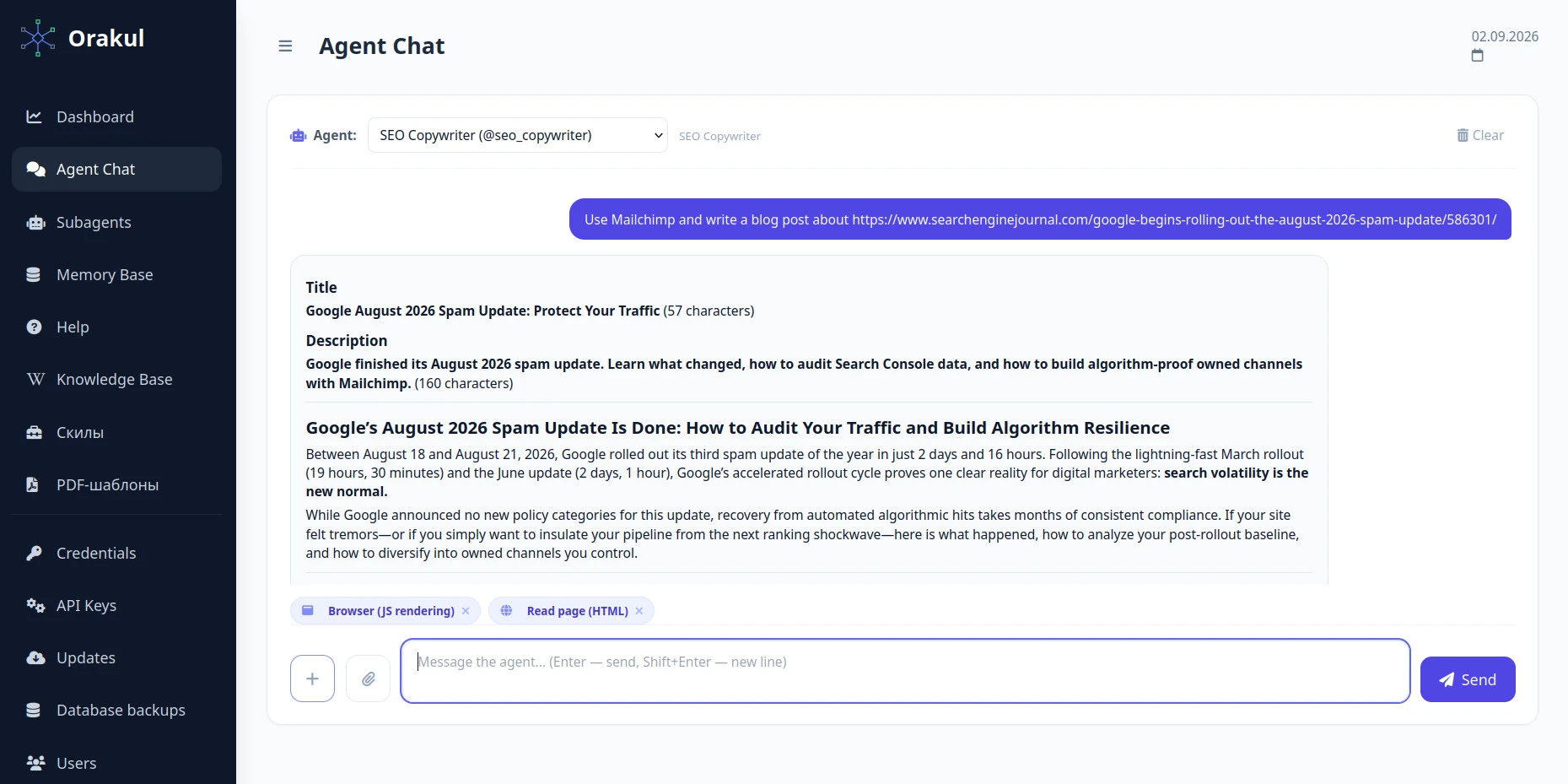
If you run or own an agency and landed on this page, you probably weren't searching for "how to build an AI agent." You were searching for a way to raise the quality of the copy your agency delivers, without growing headcount or payroll to do it. It's 2026 — everyone's already using AI to write. The question isn't whether to use it; it's why the same tool makes some agencies' copy noticeably better and turns other agencies' copy into generic AI filler that a client spots by the first paragraph. This article is about landing in the first group.
What this agent should actually do
One job: turn a short brief into a finished first draft — an article, a landing section, a social post — in the brand's actual voice, not a generic competent one. Not a plan for a draft, not three options to pick from unless the brief asks for that. A draft ready to edit and ship.
The role: name, task, knowledge base
Same three fields as every other role on this site: a name ("Copywriter"), a task description (what it writes and for whom), and a knowledge base. The knowledge base is where this role lives or dies — see the next two sections.
The system instruction
You are an expert SEO copywriter. Prepare copy for the user's task so
that it's useful for the reader and effective for search visibility.

Work through this process:
1. Define the purpose of the text, the target audience, and the search
   intent.
2. Use target keywords naturally, without overstuffing.
3. Build a logical structure: H1, H2/H3, short paragraphs, lists where
   useful.
4. Write clearly, persuasively, and with expertise; avoid filler,
   clichés, and unverifiable claims.
5. Account for E-E-A-T: practical value, accuracy, trustworthiness,
   specificity.
6. Add meta tags: a Title up to 60 characters, a Description up to 160
   characters.
7. Check the text for readability, originality of phrasing, and fit
   with the SEO task.

Output the result in this format:
- Title
- Description
- H1
- Structured SEO copy
- If relevant: the list of keywords used / recommendations for further
  refinement.
Without a knowledge base vs. with one
The two files attached to this article are real output from this exact role, both on the same source: an SEJ report on Google's August 2026 Spam Update. Request 1 was a plain brief: write an article about the update's results, based on that report. Request 2 added three words: "Use Mailchimp." Same topic, same source, same system instruction — read them back to back and the difference in voice and framing shows up in the first paragraph.
Notice what the system instruction above does not contain: any line telling the agent to consult a knowledge base. That's deliberate. The knowledge base is selected in the request, by name — those three words are the mechanism, not a shortcut around it.
Why the knowledge base is named per request, not fixed in the prompt
This looks like a limitation for about thirty seconds, until you count your clients. An agency doesn't have one voice to write in — it has one per client, across industries that share nothing. Bolt a single knowledge base into the system prompt and you've built a copywriter for exactly one of them.
Naming it per request turns the same role into a universal soldier. Point it at one knowledge base and it writes about nuclear power engineering — the right terminology, the figures, the formulas, the register that audience expects. Point it at another and the same role produces an enthusiastic review of Company X's new pink backpack. One role, one system instruction, one set of tools; the client's knowledge base is the variable, supplied per task.
The practical consequence for your team: the brief has to name the knowledge base every time, the same way it names the client. That's a line in your task template, not a habit you hope people remember — "Client: X. Knowledge base: X." Miss it and you get the neutral draft from the first file below, which is exactly what that file is there to demonstrate.
Building a tone-of-voice knowledge base when you don't have one yet
Most agencies and small companies already have the raw material for this — it's just never been collected anywhere. The source doesn't need to come from outside: your own site, or your client's, almost certainly has pages whose tone and content are already signed off — an About page, case studies, blog posts that already went through review.
The demo attached to this article uses Mailchimp specifically because it's a real company with genuinely documented, independently verifiable tone-of-voice research — a clean, checkable example for a public article. For your own setup, skip the search for a public example entirely and just point at what's already approved:
- Pull about 10 already-published, approved pages from your own site or the client's — an About page, case studies, blog posts that already cleared review.
- Strip each one down to its actual text — no navigation, no ads, no footer — and paste all of them into one plain Markdown file, one after another. One file, not ten: this is the knowledge base document the role's retrieval will search over, and a single file with ten examples in it gives that search more to draw on per query than ten separate files ever would.
- Load that one file into the role's knowledge base as-is, unedited. The agent extracts the stylistic pattern from volume; it doesn't need a pre-written rulebook.
There's no "swap it out later" step here, because it was real material from day one — the agent anchors to a tone and set of facts that are already true of the brand, not a borrowed stand-in.
A neutral test prompt
The Google-update brief above wasn't picked at random. A straight news-style task like "write an article about a recent Google update, based on this source" carries no built-in tone of its own — nothing about the request nudges the model toward a particular voice. That's what makes it a fair test: whatever tone shows up in the output has to have come from the knowledge base, not from the topic.
Testing and tuning
Run five briefs through the role and read the drafts against three already-approved pieces of copy, back to back. If a reader familiar with the brand can't tell which pieces came from the agent, the knowledge base is doing its job. If they can tell instantly, the gap is almost always too few examples in the knowledge base, not a bad prompt.
Common mistakes
- One example in the knowledge base. A single approved article isn't a style — the model needs enough examples to find the pattern, not memorize one instance of it.
- A written rulebook instead of real examples. "Be friendly but professional" describes nothing a model can act on. Ten real examples teach more than one page of adjectives.
- Never comparing with-KB output against without-KB output. Without that comparison, a generic-sounding draft is easy to mistake for a fine one.
- Forgetting to name the knowledge base in the brief. The agent doesn't pick one on its own — no name in the request means the neutral draft. Put the line in your task template next to the client name so it can't be skipped.
- Hard-wiring one client's knowledge base into the system prompt. It looks tidy on the first client and locks the role to that one voice — you'd need a separate copywriter role per client instead of one that serves all of them.
- Reaching for a public example instead of your own material. Unless you're writing a public demo, there's no reason to go looking for a borrowed stand-in — your own or your client's already-approved pages are sitting right there.
Knowledge base and skills aren't the same thing
Everything above is about the knowledge base — what the agent knows: your tone, your facts, your approved examples. A skill is a different layer entirely: it's what the agent knows how to do — a specialized capability that changes the actual technique behind the output, not just the reference material it draws on. Knowledge answers "what does our brand sound like." A skill answers "how do you actually structure a page that converts."
Skills are an Agency-plan capability on Orakul, on top of the per-agent tools already covered in the SEO specialist guide. A concrete example: the conversion copywriter skill on mcpmarket.com adds structured conversion-copywriting technique — the kind of thing a direct-response specialist would apply to a landing page or an offer — on top of whatever tone and facts the knowledge base already supplies. The knowledge base makes the copywriter sound like you; a skill like this one makes it write with a specific, proven persuasion technique on top of that voice.
≈ $250 saved per month at 10 clients
5+ hours is the usual time from a blank page to a publishable first draft — research, structure, writing, a self-edit pass. At one article per client per month that's 50 hours across 10 clients; at the fully-loaded junior rate this site uses throughout ($850/mo ÷ 160 h ≈ $5/h), roughly $250 a month. Substitute your own rate and your real hours — the result comes out far higher.

0 comments
No comments yet — be the first to share your thoughts.
Sign in to post your comment instantly:
…or comment as a guest — guest comments appear after moderation.